
This is a SaaS-only release.
AI Guardrails
Unified download for scanner package testing
To support users who are testing a scanner package with their own labeled dataset of prompts, we’ve added a unified download for the entire package results. From the Dataset results panel in Playground, users can:
- View F1 scores and confusion matrix analysis for each scanner in the package.
- Download a single CSV showing the outcome of every prompt, for every scanner in the package.
Other Guardrails enhancements
- In Chat, the chat box height has been enlarged to accommodate two lines of text before expanding.
- Both card view and table views in Projects are now ordered by “Last updated”, so active projects are shown first.
AI Red Team
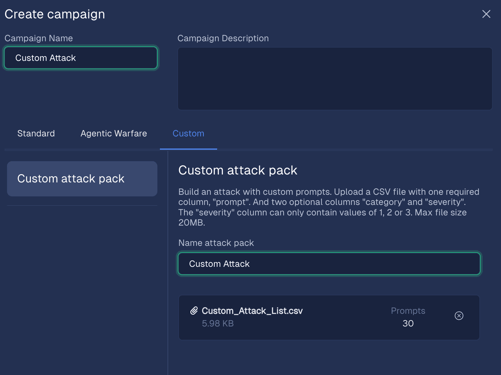
Custom attacks for Red Team campaigns
We're excited to announce the launch of Custom Attacks, a new feature designed to help you consolidate all your AI application testing within a single tool and report.
This feature enables you to upload your existing datasets of attack prompts directly into your Red Team campaigns. Now, you can combine your proprietary attacks with our existing attack types (signature, operational, agentic) or run campaigns consisting solely of your custom prompts.
Key capabilities include:
- Upload a CSV of your malicious prompts when creating a new custom attack campaign. Optionally include columns for severity and category.
- Run custom attacks as their own campaign, or include them with standard and agentic attacks so all attacks are in one report.
- Leverage scheduling and recurring run capabilities to operationalize custom attack runs.
- View results in the Red Team report, raw data view, and report download.
NOTE: Custom attacks are not automatically evaluated for true and false positive outcomes. To evaluate the results, download the report and run your own evaluation script.
Control your Red Team data retention policy
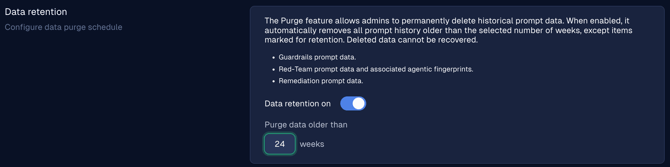
Our data retention policy feature now covers both Guardrails and Red Team, ensuring that customers can meet their compliance and governance requirements for data. To configure a data retention policy:
- Navigate to Settings > Organization and scroll to the Data retention section.
- Turn the data retention toggle on and specify the purge interval in weeks. The default is 12 weeks.
- Click the Save configuration button to deploy the policy.
- Any Red Team raw data results, as well as agentic fingerprints logs, will be purged on a rolling basis when they reach the retention period.
- If you wish to retain any reports and exempt them from the policy, navigate to that report's detail and click the Retain data checkbox in the top right. Individual log entries can be retained in the Logs > Prompt history table as well.
Note: The same data retention policy applies to both AI Guardrails and AI Red Team. If you currently have a retention policy for AI Guardrails, it will be automatically applied to your AI Red-Team data.
January attack pack: Persona bullying
This month’s attack pack includes a new attack vector: Persona Bullying. This is a prompt injection technique that exploits a model's assigned personality by leveraging psychological duress. It tricks an LLM into providing instructions for harmful actions (like building a weapon or planning a malicious act) by disguising the query as a benign, philosophical, or creative task.
January's attack pack contains 10,000+ new attacks, including almost 700 persona bullying attacks.
Other Red Team enhancements
- We’ve reorganized the Raw data view table to put related items nearer to each other and remove redundant data such as the Report column. Additionally, the Campaign column now shows the campaign name rather than the campaign ID, and the Attack type column has been correctly renamed Attack vector.
- Attacks in the Create campaign panel are now ordered newest-to-oldest, so its easier to identify the latest attack vectors.
- Users can now easily deselect all converters for an attack vector by unclicking the All converters toggle. This is useful when creating an attack campaign that only uses plaintext prompts, or if you want to run a smaller set of attacks for each vector.
Platform
- Hugging Face connections are now made the same way as for other providers: by entering the API key and the model name (rather than selecting from a dropdown).
- The API Key field for Azure and Hugging Face connections are now obfuscated during input to improve security.
- Numbers in the UI now use commas (e.g., 10,000) for better readability and to distinguish them from dates.
Bug fixes
- Users reported that the Create project animation was too slow. Resolution: The animation is sped up and the wizard modal closes instantly after the final text appears.
- The API Token count in Project settings remained incorrect after tokens were revoked, showing an inflated number on subsequent visits. Resolution: Fixed.
- The mouse cursor failed to change to a clickable state (pointer) when hovering over expandable categories in the Custom Roles table, reducing discoverability. Resolution: Fixed.
- The info icon in Settings used a filled style, contradicting the standard outline style used across the platform. Resolution: Fixed.
- Clicking on suggested text in the custom intent AI assistant immediately closed the pop-up, preventing text selection and use. Resolution: Fixed.
- The Discard changes modal on the Attacks campaigns page only appeared once, allowing subsequent bypass of the discard warning. Resolution: Fixed.
- All filter panel input fields were incorrectly sized at 36px instead of the standard 34px height. Resolution: Fixed.
- The Upload and test a dataset wizard incorrectly displayed a redundant text string: "Step 2: Step 2: Select the scanner...". Resolution: Fixed.
- The In Progress label was absent for a single scanner run initiated in the Upload dataset workflow, lacking clear status feedback. Resolution: Fixed.
- Label-field spacing in the Attack run form was too tight, resulting in a condensed and less readable layout. Resolution: Fixed.
- The filter for attack vectors in the Reports Raw data view failed to populate the list of vectors available for filtering. Resolution: Fixed.
- Clicking the selected scanner count link in the Playground caused the scanner side panel to open and immediately auto-close. Resolution: Fixed.
- The Playground scanner panel did not automatically close after clicking the "edit scanner" icon, obscuring the view. Resolution: Fixed.
- Retrieval of old audit logs failed with an HTTP 500 error because the system could not handle deprecated permission names. Resolution: Fixed.
- POST/v1/scans returned text HTTP 500 when overriding Regex Scanners, as the pattern was received as an uncompiled string, causing an AttributeError during .find_spans(). Resolution: Fixed.
Known issues
- We uncovered an issue where an unexpected job failure can prevent automated rate limits from resetting. This can block subsequent customer campaigns from starting.
- Uploading a misconfigured or empty CSV file when editing a custom campaign can result in an unexpected error.